
What are Phishing Emails?
In a phishing attack, cyber criminals use deceptive emails to “fish for” information and lure people into falling for scams. These emails are carefully designed to trick you into revealing financial information, login credentials, or other sensitive data. Or, they may secretly install dangerous software (malware) that compromises your computer and the files on it.
Phishing emails typically pressure you to act quickly, without thinking. They play upon strong emotions — such as curiosity, fear, or greed. These psychological manipulation tactics are sometimes known as “social engineering.” Phishing emails also use a variety of technical tricks to steal information:
- Malicious web links – You’re asked to click on a link that takes you to an imposter website or to a site infected with malware.
- Malicious attachments – You’re urged to open an unexpected attachment that contains malware.
- Fraudulent data-entry forms – You’re prompted to fill in sensitive information like user IDs, passwords, credit card data, phone numbers, and crypto wallet addresses.
The Consequences of Falling for a Phish
At Work…
- Loss of corporate funds.
- Exposed personal information of students and coworkers.
- Outsiders accessing confidential communications, files, and systems.
- Files become locked and inaccessible.
- Damage to employer’s reputation.
In Your Personal Life…
- Money stolen from your bank and investment accounts.
- Fraudulent charges on credit cards.
- Tax returns filed in your name.
- Loans and mortgages opened in your name.
- Lost access to photos, videos, and files.
- Fake social media posts made in your accounts.
How to Report Phish Emails
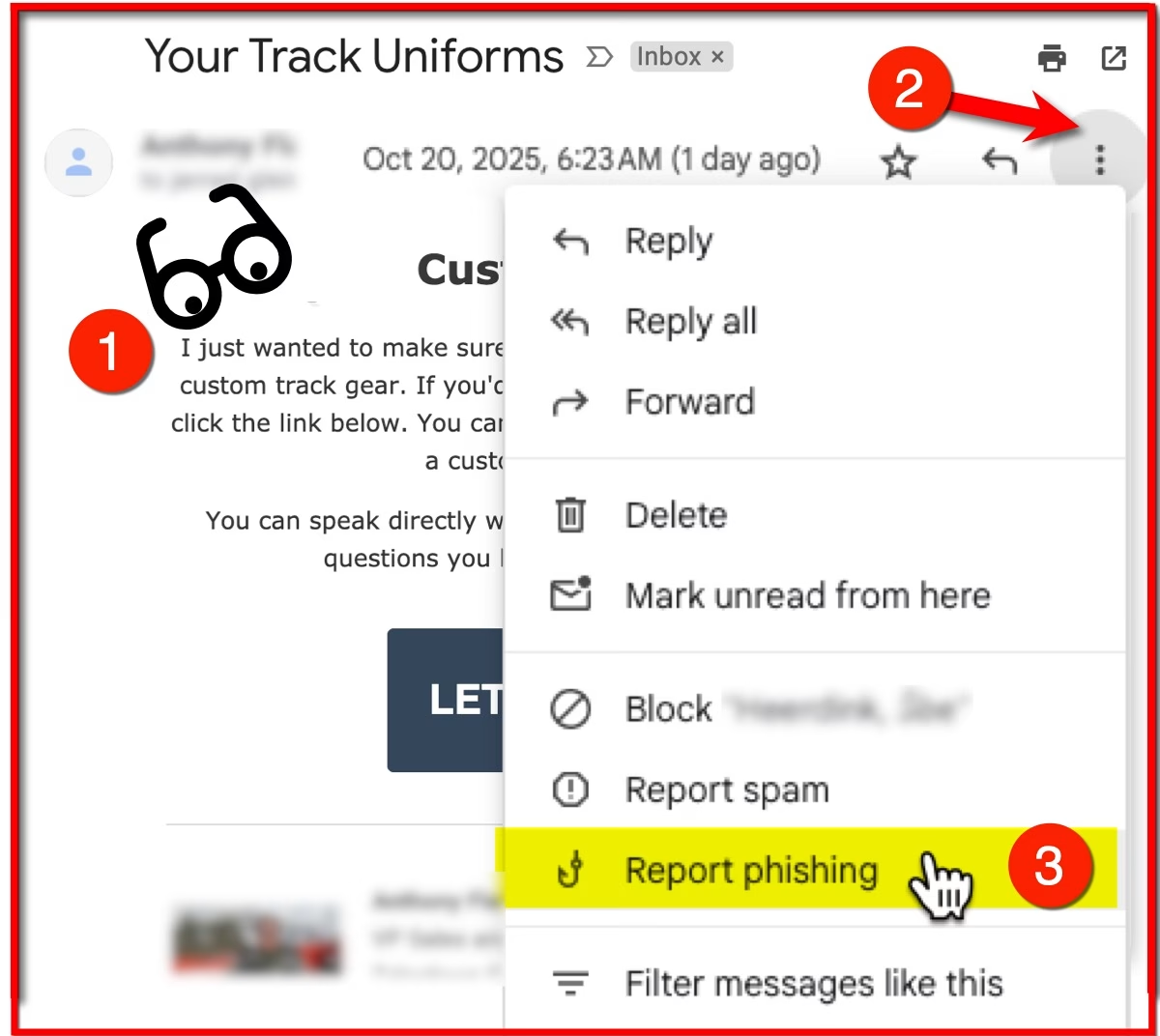
Gmail now has an option for users to report phishing emails to Google. Here’s how to report emails that are suspected as being a phish.
1). View the email using any browser.
2). Click the 3-dots button in the top-right of the message window.
3). Select Report phishing.
The email will be moved to your Spam folder and Google will be notified of the email.
The EVSC Office of Technology does not receive notifications of emails being marked as phish. However, they can review these emails in the district’s Google Administrative Tools.
Are Spam emails the same as Phish emails?
If you are receiving spam or marketing emails from legit companies, do NOT use the phishing option.
You can simply (A) Delete these types of emails or (B) Mark them as Spam or Unsubscribe if you are getting too many emails from a website that you subscribed.